Every developer knows this feeling. You hit deploy, everything looks fine on staging, and then five minutes later production is on fire and your phone won't stop buzzing. The worst part? Every single user got the broken version at the exact same moment.
Here's the thing though, it doesn't have to work like that. There's a deployment strategy that big companies like Meta, Google, Netflix, and Stripe have been using for years, and honestly, once you understand it, deploying to everyone at once starts to feel a little reckless.
It's called a canary deployment (or canary release), and today I want to break down what it is, how it works, and how the big players do it.
Why "Canary"?
The name comes from coal mining. Miners used to carry a canary in a cage down into the mines. Canaries are small and breathe fast, so if toxic gas leaked in, the bird would react before the miners did. It was a living early-warning system.
A canary deployment works the same way. Instead of pushing a new version to your entire user base, you release it to a small group first. That small group is your canary. If something is wrong, they feel it before everyone else does, the damage stays tiny, and you can pull back before the problem spreads.
The definition is as simple as it gets: you roll out the change to a small subset of users, watch what happens, and only then roll it out to everybody. You might also hear it called a phased rollout or incremental rollout, same idea.
How It Actually Works
The core setup is simple. You run two versions of your app in production at the same time:
- The control: your current stable version, serving most of your traffic.
- The canary: the new version, serving a small slice (often 1-5%). A router, load balancer, or feature flag decides who lands where.
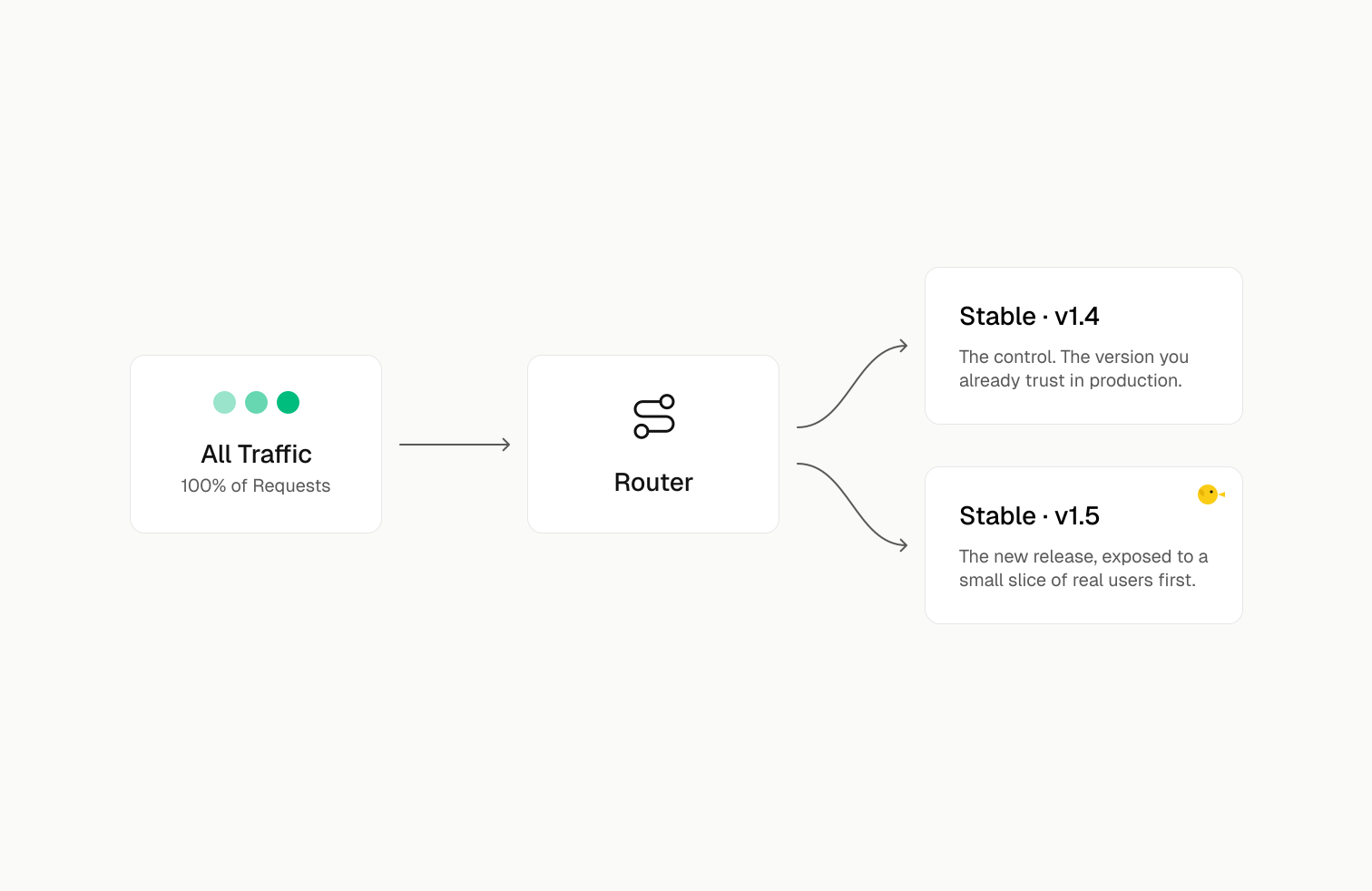
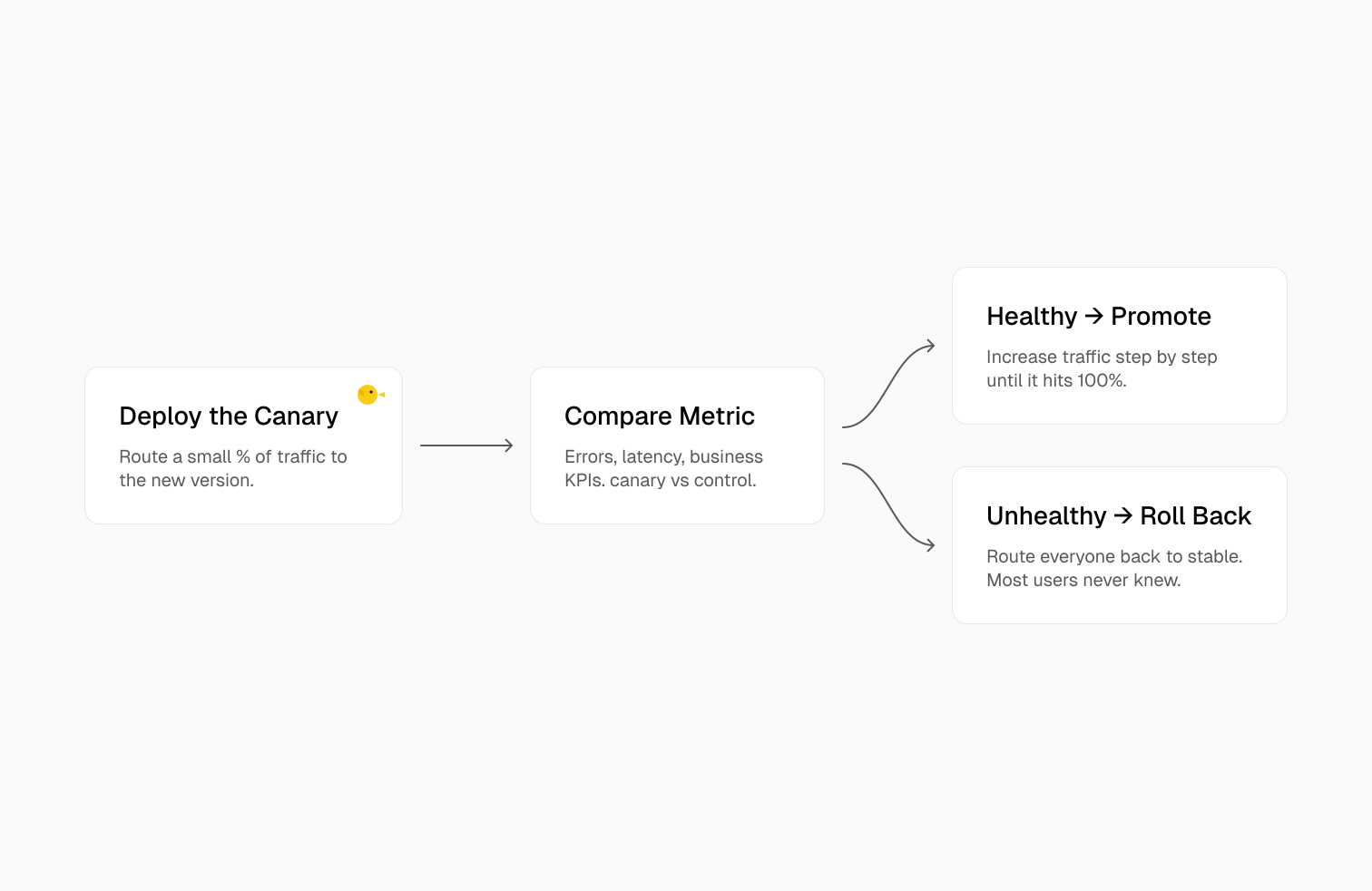
Then you compare the two groups. Is the canary throwing more errors than the control? Is it slower? Are users behaving differently? Google's SRE Workbook describes canarying as basically an A/B comparison between the canary and the control, and that comparison is the whole point. You're not guessing if the release is good, you're measuring it against a live baseline.
If the canary looks healthy, you gradually shift more traffic to it: 1%, then 5%, then 25%, then everyone. If it looks bad, you route traffic back to the stable version, and most of your users never even knew something went wrong.
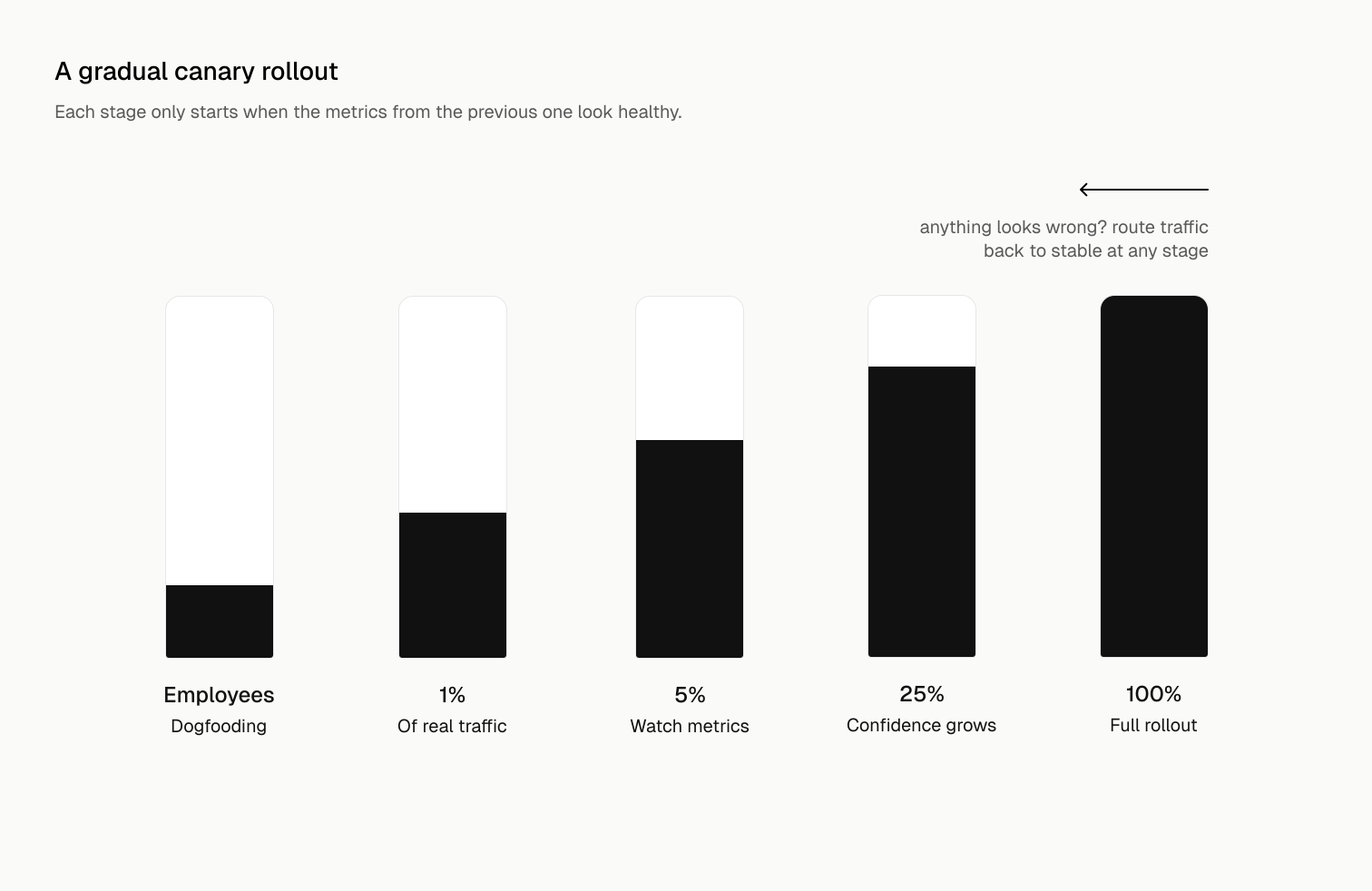
AWS describes two flavors of this in their deployment whitepaper: a two-step approach (small canary group, then everyone at once) and a linear approach (keep increasing traffic in increments until 100%). Both count as canary deployments, the difference is just how gradually you open the gates.
The Math That Makes This So Powerful
This is my favorite part, because it shows why canaries are not just "nice to have."
Imagine your new release has a nasty bug that fails 20% of requests. If you deploy it to everyone, 20% of all your traffic fails. That's an incident, angry users, maybe a postmortem meeting you really don't want to attend.
Now imagine you deployed it as a canary to just 5% of traffic. That same bug now affects 20% of 5%, which is a 1% overall error rate. Still bad, still needs fixing, but it's a blip instead of an outage. The Google SRE team uses this exact example, and the takeaway is simple: the damage from a bad release is directly proportional to how much traffic you exposed to it.
Same bug. Wildly different blast radius.
What Should You Actually Monitor?
A canary is only useful if you're watching the right signals. Watch too little and bad releases slip through. Watch too much and your canary process becomes noisy and people start ignoring it (which defeats the whole purpose).
A good rule is to monitor both operational metrics and business KPIs, and Google's SRE team suggests starting from your SLIs, the metrics that map most directly to user pain. Here's a practical starting point:
One interesting warning from Google's experience: raw CPU usage is usually a bad canary metric. It fluctuates for reasons that have nothing to do with your release, and a flaky canary check gets ignored fast. Pick a small set of metrics (they suggest no more than a dozen) that clearly indicate real user-facing problems.
How the Big Companies Do It
Meta
Meta's web releases go out in tiers. New code is first pushed to Facebook employees only, real people using the real product, with alerts that block the push if anything regresses. If that passes, the release goes to a small canary slice of production (around 2% in their classic setup), and only then to 100%. Monitoring runs the whole way through, with an emergency stop button ready. On mobile, they make release candidates available daily to canary users, including around a million Android beta testers, before the public ever sees a build.
I love the employee-first stage. Your own team becomes the very first canary, and they're the group most likely to report weird behavior instead of silently churning.
Google literally productized the canary idea. If you've ever heard of Chrome Canary, that's an entire browser channel named after this strategy, a bleeding-edge version updated nightly for developers and early adopters, sitting ahead of the Dev, Beta, and Stable channels. Changes prove themselves with canary users before they reach billions of people. Internally, Google's SRE practice treats canary analysis as a core part of release engineering, with one strong rule worth stealing: run one canary at a time. Overlapping canaries contaminate each other's signals, and suddenly you can't tell which change caused the problem.
Netflix
Netflix took it a step further and automated the judgment call. They built Kayenta, an automated canary analysis tool integrated into their Spinnaker delivery platform, which statistically compares canary metrics against the control and produces a score. If the score is bad, the rollout stops without a human needing to stare at dashboards. That's the mature end state of canarying: the pipeline protects itself.
Stripe
When your product moves other people's money, "oops" is not an option. Stripe leans on gradual rollouts, feature flags, and small backward-compatible changes, especially for risky things like database migrations, which are broken into incremental steps that never break the old version while the new one takes over. It's the canary mindset applied beyond just traffic routing: never make a change you can't quietly walk back.
A Simple Way to Try It Yourself
You don't need Netflix-grade infrastructure to start. Here are two lightweight approaches.
Option 1: weighted traffic at the load balancer. With NGINX, splitting traffic is just upstream weights:
95% of requests hit stable, 5% hit the canary. Watch your dashboards, then adjust the weights as confidence grows.
Option 2: a percentage-based feature flag. If you can't split infrastructure, split users in code:
Hashing the user ID matters, you want each user to consistently see one version, not flip between two on every request. Tools like LaunchDarkly, Unleash, or Statsig do this properly for you, and Kubernetes users can get weighted canary rollouts through Argo Rollouts or Flagger.
The Trade-offs (Because Nothing Is Free)
Canary deployments are great, but be honest about the costs:
- You're running two versions at once. Your database, APIs, and caches need to tolerate both. Backward-compatible changes become a discipline, not a suggestion.
- You need real observability. A canary without good monitoring is just a slow deployment. If you can't compare canary vs control metrics, you're flying blind.
- Client-side software is harder. For installed apps, you can't force users onto the canary or instantly pull them off it, which is why mobile canaries (like Meta's beta programs) take longer to evaluate.
- Don't confuse it with A/B testing. They look similar technically, but a canary answers "is this release broken?" while an A/B test answers "which variant performs better?" Mixing the two muddies both signals.
Final Thoughts
Deploying to 100% of users at once is basically betting your whole user base on your staging environment being a perfect copy of production. It never is.
Canary deployments flip that bet. You let a small group take the risk, you watch honestly, and you earn the right to scale up. The tooling can be as simple as an NGINX weight or as fancy as Netflix's automated analysis, but the mindset is the same either way: start small, watch closely, expand only when it's safe.
The canary is healthy. Open the gates.